Google search VS.NET macro

Here’s a handy little Visual Studio .NET macro which searches for the currently highlighted term in Google. The search is launched as a new tab within the IDE when you press

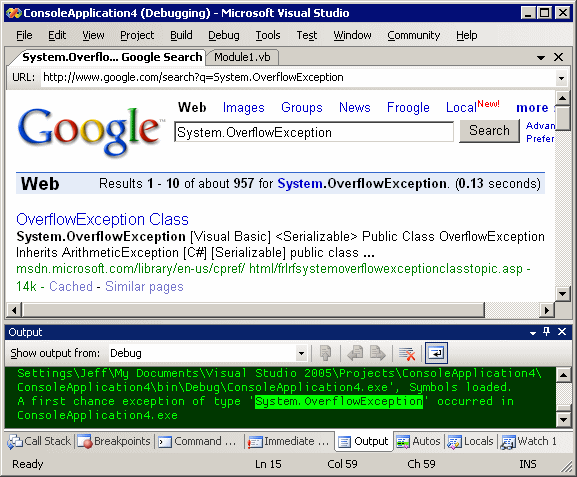
I know what you’re thinking: you’ve seen this macro before. Yeah, but this one goes to eleven. It actually works with any highlighted text in the IDE – including highlighted text from the Output window:
Here’s the macro code (updated 11/26/2007*):
Public Sub SearchGoogleForSelectedText()
Dim s As String = ActiveWindowSelection().Trim()
If s.Length > 0 Then
DTE.ItemOperations.Navigate(“http://www.google.com/search?q=” & _
Web.HttpUtility.UrlEncode(s))
End If
End Sub
Private Function ActiveWindowSelection() As String
If DTE.ActiveWindow.ObjectKind = EnvDTE.Constants.vsWindowKindOutput Then
Return OutputWindowSelection()
End If
If DTE.ActiveWindow.ObjectKind = “{57312C73-6202-49E9-B1E1-40EA1A6DC1F6}” Then
Return HTMLEditorSelection()
End If
Return SelectionText(DTE.ActiveWindow.Selection)
End Function
Private Function HTMLEditorSelection() As String
Dim hw As HTMLWindow = ActiveDocument.ActiveWindow.Object
Dim tw As TextWindow = hw.CurrentTabObject
Return SelectionText(tw.Selection)
End Function
Private Function OutputWindowSelection() As String
Dim w As Window = DTE.Windows.Item(EnvDTE.Constants.vsWindowKindOutput)
Dim ow As OutputWindow = w.Object
Dim owp As OutputWindowPane = ow.OutputWindowPanes.Item(ow.ActivePane.Name)
Return SelectionText(owp.TextDocument.Selection)
End Function
Private Function SelectionText(ByVal sel As EnvDTE.TextSelection) As String
If sel Is Nothing Then
Return ""
End If
If sel.Text.Length = 0 Then
SelectWord(sel)
End If
If sel.Text.Length <= 2 Then
Return ""
End If
Return sel.Text
End Function
Private Sub SelectWord(ByVal sel As EnvDTE.TextSelection)
Dim leftPos As Integer
Dim line As Integer
Dim pt As EnvDTE.EditPoint = sel.ActivePoint.CreateEditPoint()
sel.WordLeft(True, 1)
line = sel.TextRanges.Item(1).StartPoint.Line
leftPos = sel.TextRanges.Item(1).StartPoint.LineCharOffset
pt.MoveToLineAndOffset(line, leftPos)
sel.MoveToPoint(pt)
sel.WordRight(True, 1)
End Sub
I tested the macro in VS.NET 2003 and VS.NET 2005 and it works great with no modifications in either environment. Here’s how to install it:
- go to Tools - Macros - IDE
- create a new Module with a name of your choice under “MyMacros.” Or use an existing module.
- paste the above code into the module
- add a reference to the System.Web namespace (for HttpUtility) to the module
- close the macro IDE window
- go to Tools - Options - Environment - Keyboard
- type “google” in the Show Commands Containing textbox. The SearchGoogleForSelectedText macro should show up
- click in the Press Shortcut Keys textbox, then press ALT+F1
- click the Assign button
- click OK
It’s really quite handy; ALT+F1 is a totally natural chord and a logical superset of F1.
*Courtesy Bojan Bjelic, the macro now works in .aspx source (html) view.